For people with more than one Claude subscription account on one Mac
aolangai
See every account's quota and the Claude Code sessions open on your Mac, in one window and in the menu bar. When a Claude Code session has work to hand off, the aolangai command sends it to the account with the most quota left.
macOS on Apple silicon · build from source · MIT
Demo
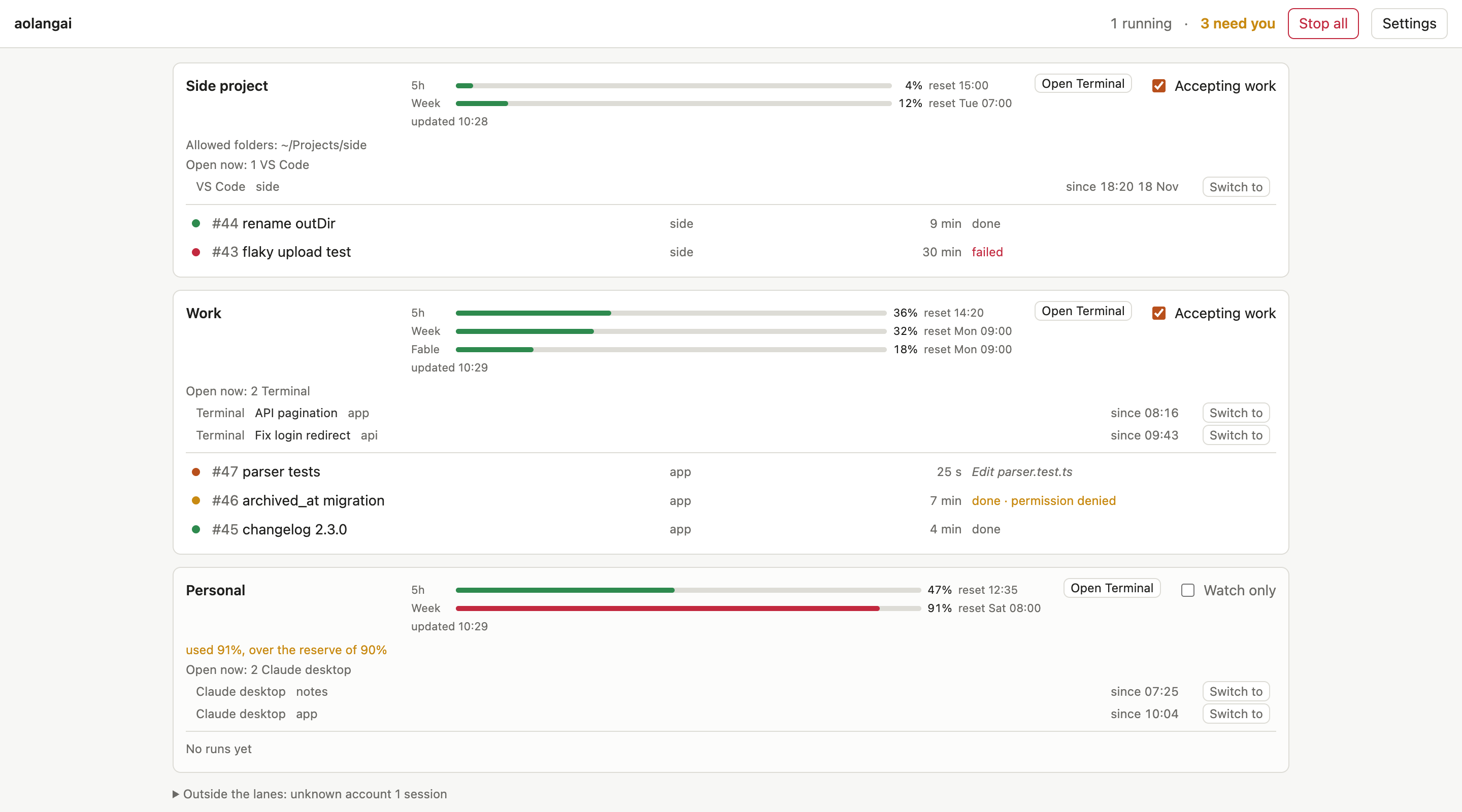
This is the app's real window, running on invented accounts and runs. Nothing in it talks to Claude or to your machine. Buttons that need a real Mac say in the bar at the top what they would do. Press Escape to leave the demo.
Open the demo on its own page
The live demo needs a screen at least 900 pixels wide; this is its main screen, with the same sample data. Open the demo anyway
What it does
Every account's quota in one place
Each account's lane has its quota bars: 5 hours, week, and per model when there is one, updated every minute. The menu bar has a quota line per account. Needs you collects runs that failed, hit a limit or had a permission denied, and accounts over their reserve.
Open sessions, per account
Every 10 seconds the app lists the Claude Code sessions open on the Mac and shows each on its account's lane, with Switch to to bring its Terminal tab or app to the front. Switch to and the session names use Terminal automation that is not yet confirmed by a person on the packaged app.
Carry on with another account
When the account you work in runs out of quota, Open Terminal on another lane opens Terminal in a folder you pick, running claude on that account. The session is yours, not a delegated run. The Terminal automation is covered by tests but not yet confirmed by a person on the packaged app.
Delegate work from Claude Code
Ask Claude Code to delegate work to a subagent, to move work to another account or to spread tokens across your accounts, and the aolangai skill has it call the command instead of starting its own subagent. The work runs on the account with the most quota left among those Accepting work; the result comes back to the session. Used for real from Claude Code in a terminal only; from Claude desktop it is not verified yet.
Private by design
- The only
claude it runs is the one you installed. Logging in goes through Claude's own claude auth login; aolangai never reads, stores or forwards a login token, and does not touch the Keychain.
- In an account's config dir it touches only
settings.json, to open it for you, and its own skill file. A file it did not create is never overwritten.
- To find open sessions it lists processes with
ps and keeps the claude ones of your macOS user. It reads their environment, except for Claude desktop sessions, and uses exactly one value from it, CLAUDE_CONFIG_DIR; for three credential variable names it only checks whether the name is present. It also reads each session's working folder (with lsof) and, from Terminal, the tab's tty and title.
- The app sends nothing anywhere itself. The only network use is the
claude you installed, under your own login: asking for quota, checking that an account is logged in, doing the work you delegate, and the Terminal sessions it opens for you.
What the app reads and writes, in full
Read before you install
Before you use more than one account
- Splitting load across several Claude subscription accounts is a gray area under Anthropic's terms, and you carry the risk.
- There are second-hand reports from February 2026 that Anthropic does not allow subscription logins in third-party tools, and that people using several accounts were locked out. These reports are not verified first-hand.
- The quota numbers come from an experimental call of the Claude Agent SDK, which may change or disappear in a later SDK version.
- Read Anthropic's current Consumer Terms before you rely on this tool or share it.
What aolangai never does: log in for you (logging in goes through Claude's own claude auth login), read, store or forward a login token, or run any claude but the one you installed.
aolangai is an independent open-source project. It is not affiliated with or endorsed by Anthropic.
Install
There is no download. The app is ad-hoc signed for the Mac that builds it, so you build it yourself from the repository.
-
Check the requirements
- macOS on Apple silicon.
- Claude Code (
claude) installed, with at least one Claude subscription account logged in. A claude installed under a Node version manager (nvm, fnm, volta, asdf) is not found by the app; the reference says what to do.
git (on a clean Mac: xcode-select --install).- Node 22.13 or newer, only to build. The built app does not need Node.
-
Build the app
git clone https://github.com/openyard-cloud/aolangai.git
cd aolangai
npm install
npm run dist
-
Move it to Applications and open it
Drag apps/desktop/release/mac-arm64/aolangai.app into Applications and open it. Each time it opens, it installs the skill and the command ~/.local/bin/aolangai. Closing the window leaves it in the menu bar.
-
Follow the setup card
A card at the top of the window walks you through adding your accounts in Settings → Accounts, logging each one in, and turning on Accepting work for the accounts that should take runs. Log in opens Terminal; the first time the app drives Terminal, macOS asks whether aolangai may control it. This Terminal automation is not yet confirmed by a person on the packaged app.
The README has the short guide; the reference covers the command, updating and uninstalling.